
How to Add Negative Keywords In P-MAX in 2025.
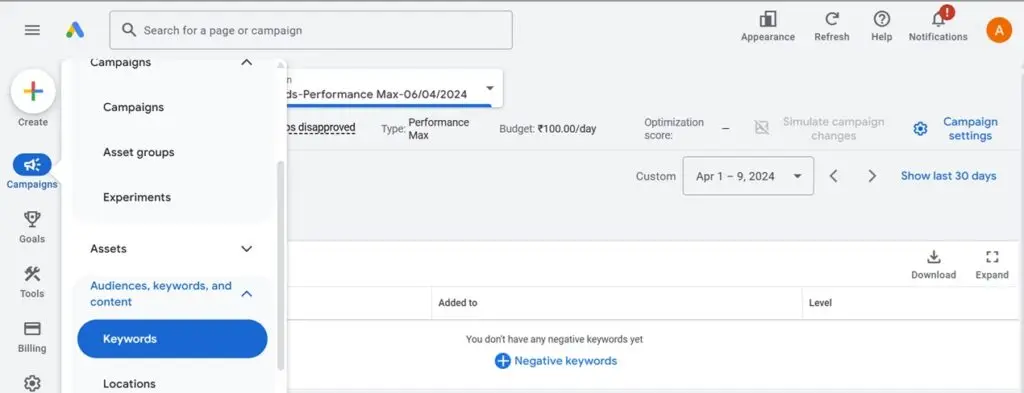
If you want your Performance Max (P-Max) campaigns to perform better and avoid wasting money on irrelevant clicks, adding negative keywords is super important. It helps make sure your ads only show up for the right audience. Here’s how you can do it in 2025:
Easy Steps to Add Negative Keywords in P-Max Campaign
Log in to your Google Ads account.
Find and open the P-Max campaign you want to work on.
Go to the Audience Segment
Once you’re in the campaign, head over to the “Audience” section.
Find the Keywords Section
Inside the audience segment, click on the “Keywords” section.
Add Negative Keywords
Look for the option to add negative keywords.
Add any generic keywords that don’t fit your business or usually lead to poor results.
Use Business-Specific Keywords
Think about what keywords don’t match your business and add those too. This makes sure you don’t pay for useless clicks.
Save and Keep an Eye on It
Don’t forget to save your changes.
Keep checking your campaign to see if you need to add more negative keywords later.
Why Bother with Negative Keywords?
Stay Relevant: Your ads won’t show up for random searches.
Save Money: No more wasting money on clicks that don’t turn into customers.
Better Results: Focuses your ads on people who are more likely to buy.
Review your negative keywords regularly to make sure your campaign keeps running smoothly and brings the best results for your business.
About Magnify Minds Media
At Magnify Minds Media, we specialize in digital marketing solutions, including Google Ads, content creation, and SEO to help your business thrive. Visit our website at www.magnifymindsmedia.in to learn more.